API Documentation
Integrate with our electricity vending services
Introduction
Welcome to Powershop.ng API! Our documentation will help you familiarize with our product and how you can integrate with it to build powerful web, mobile and POS solutions for vending electricity across 3 Discos, 11 States in Nigeria and more.
Availability
Currently, Powershop APIs are integrated with AEDC, JED, and KEDCO.
To access these APIs you must be a registered merchant. You can register here.
How it Works
Below is an illustration of how Powershop APIs give merchants access to discos without any overhead:
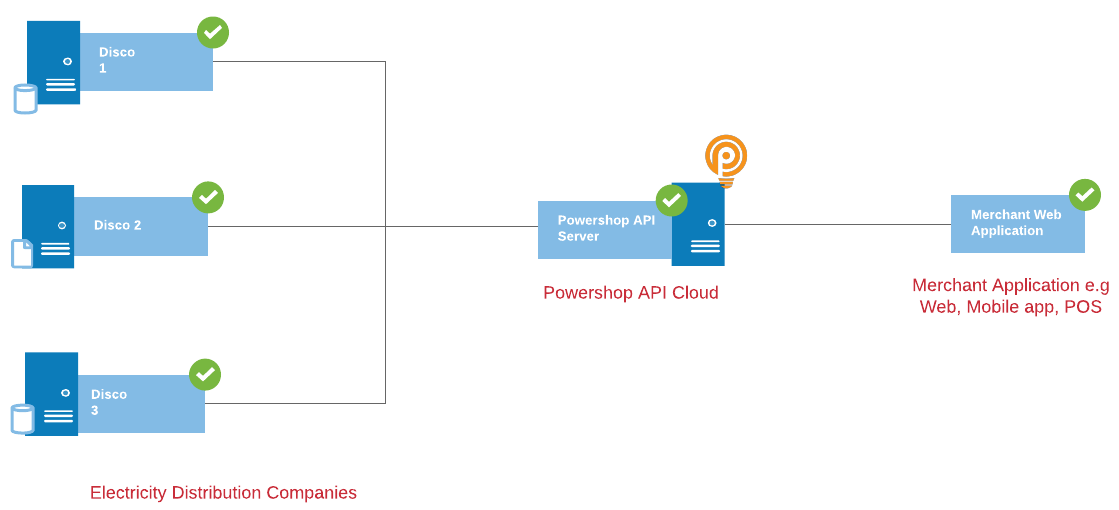
You can send meter verification/vending from your application by making an HTTP POST request to the Powershop API. For each request sent from your application, we respond with a notification back indicating that the transaction was successful or has failed.
Authentication
All API requests are secured and require an authorization before use. The credentials to generate an Oauth token can be accessed from your merchant account profile page.
There are two credentials available for use (Demo and Live). The demo service is a playground for development, to ensure your setup is working as expected.
How to Generate Access Token
Demo URL:
sandbox.powershop.ng:8081/v1/merchant/auth/token/request
Request Payload:
{
  "username": "demo_username",
  "secret": "demo_secret"
}
Successful Response Payload:
{
  "access_token": "LlIm5eBMhGLdChL1L84sVp7LfWO29JXU18kEP0vH6dKCwaBrDUAz_LkKQBAz54p8r96..G8Mb0MJnJfzfBXFffkq0B9Dym.Sg2NEKOYmkl8KICm9XqkES0s80j9CLzJCwxPzlpnUKwVgWSwlJ5x6VaaTasGMbKU7L1Y6odImo9DTTr85jc_bMRul7ji_h1ziYxTsaO2OSfFPaRYSL6W8Iegk5Ex_VK139oG4Whn0MUpttmXfIEELNsJD7th5yCd2",
  "token_type": "Bearer",
  "expires_in": 40000
}
Making An Authorized Request
To make an authorized request you must add a HTTP request header:
Key: Authorization
Value: Bearer access_token
Replace the access_token with the value obtained from the authentication request.
Meter Number Validation
Meter number validation is the first step for vending in any disco.
URL Post Request
Demo URL:
sandbox.powershop.ng:8081/v1/merchant/meter/validation/request
Request Payload:
{
  "meterNumber": "04214346555",
  "meterType": "prepaid",
  "mobileNumber": "080123456000",
  "amount": 5000,
  "merchantReference": "123456",
  "disco": "kedco"
}
Request Parameters
| Element | Type | Description |
|---|---|---|
| meterNumber | String - Compulsory | The meter number you want to validate for vending/token generation |
| meterType | Enum - prepaid or postpaid | The meter type to validate for |
| mobileNumber | String - Compulsory | The mobile number of the client you want to vend for |
| amount | Double - Compulsory | The amount the client wants to vend |
| merchantReference | Alphanumeric - Compulsory | A string that should be generated from your application for this transaction |
| disco | Enum - aedc, jed, kedco | The disco you want to verify against the meter number |
Successful Response Payload:
{
  "status": "Success",
  "description": "Successful meter verification",
  "code": 00,
  "data": {
    "transactionId": "01cd7172-a0cc-44ba-afe7-0cfc2b2f33d3",
    "referenceNumber": "123456",
    "meterNumber": "04214346555",
    "meterType": "prepaid",
    "minimumPurchase": 100,
    "discoType": "kedco",
    "customerName": "Hayatu Shuaib",
    "customerAddress": "",
    "mobileNumber": "08068869000"
  }
}
Meter Vending / Token Generation
It is mandatory to have a meter number verified before vending/token generation.
URL Post Request
Demo URL:
sandbox.powershop.ng:8081/v1/merchant/token/generation/request
Request Payload:
{
  "referenceNumber": "20ffb6c7-928c-427a-8f90-ecdc6cefb19e",
  "amount": "5000"
}
Request Parameters
| Element | Type | Description |
|---|---|---|
| referenceNumber | String - Compulsory | The reference number generated by our API during the meter number verification stage |
| amount | String - Compulsory | This amount is important. During meter number verification if the minimumPurchase is higher than the first proposed amount, it's important for your application to increase the amount to avoid vending errors. This amount must be higher than the minimumPurchase amount. |
Successful Response Payload:
{
  "status": "Success",
  "description": "Successfully token generation",
  "code": 00,
  "data": {
    "referenceNumber": "20ffb6c7-928c-427a-8f90-ecdc6cefb19e",
    "amount": 5000,
    "token": "6782 4150 4464 8983 8558",
    "transactionDate": "2018-11-24 16:53:19.045",
    "meterNumber": "04214346555",
    "merchantReference": "123456"
  }
}
Check Transaction Status
The status of a transaction can be checked using this endpoint.
URL Post Request
Demo URL:
sandbox.powershop.ng:8081/v1/merchant/transaction/status/request
Request Payload:
{
  "referenceNumber": "123456",
  "disco": "aedc"
}
Request Parameters
| Element | Type | Description |
|---|---|---|
| referenceNumber | String - Compulsory | The reference number generated by our API during the meter number verification stage |
| disco | Enum - aedc, jed, kedco | The disco you want to verify against the meter number |
Successful Response Payload:
{
  "status": "Success",
  "description": "Successful Transaction retrieval",
  "code": 00,
  "data": {
    "referenceNumber": "ABNghoamoww",
    "merchantReference": "123456",
    "meterNumber": "04214346555",
    "token": "xxxx-xxxx-xxxx-xxxx",
    "transactionDate": 2020-02-10T10:10:10.000,
    "amount": "7000"
  }
}
Check Merchant Wallet Balance
This endpoint enables you to view how much credit amount is left in your Merchant Wallet Account.
URL GET Request
Demo URL:
sandbox.powershop.ng:8081/v1/merchant/wallet-balance/request
Successful Response Payload:
{
  "status": "Success",
  "description": "Merchant Wallet Balance",
  "code": 00,
  "data": {
    "amount": "7090.3"
  }
}
API Status Codes
List of possible status codes from our application response(s).
| Code | Description |
|---|---|
| 0 | Transaction is successful |
| 601 | Failed transaction (mostly network error) |
| 605 | Vending amount lower than the minimum purchase for a meter number in question |
| 600 | Insufficient Funds in merchant account |
| 606 | Transaction not found |